Best Budgeting Apps for iPhone
Compare Expensa, CoinKeeper, Saldo, Money OK, Money Flow and Realbyte for spending limits, budget periods and everyday expense tracking on iPhone.
Get the appExpensa is a practical starting point if you want to set a spending budget, see what remains and bring eligible Apple Pay purchases into the same record. You can use an overall budget on its free plan, choose the start of your budget month and add category limits with Premium.
Other iPhone budgeting apps emphasize different parts of the job. CoinKeeper puts monthly planning into a visual account view. Saldo combines budgeting with supported bank connections. Money OK and Money Flow organize spending alongside accounts and reports. Realbyte Money Manager gives you detailed account management and weekly, monthly or annual planning.
Choose the app around the decision you want to make before spending. “Where did my money go?” needs a useful history. “Can I afford this within my plan?” also needs a spending limit and a meaningful period.
Compare iPhone budget planners
| App | Planning approach | What matters when choosing |
|---|---|---|
| Expensa | Overall spending budget, configurable monthly start and Premium category limits | The overall budget is free; category limits, sharing and budget widgets need Premium. Basic Apple Pay import is free. |
| CoinKeeper | Monthly budgets with a visual transaction interface | Match the classic iPhone app and its Premium offer to the functions you want. |
| Saldo | Monthly budgeting alongside manual and supported connected accounts | Confirm the bank and country you need, as well as the account allowance in your plan. |
| Money OK | Budget tracking alongside income, expenses and multiple accounts | Keep your spending target distinct from the balance of your accounts. |
| Money Flow by Hermann Wagenleitner | Flexible budgets, scheduled transactions and account records | Decide which planned payments and transfers should affect the spending picture. |
| Money Manager by Realbyte | Weekly, monthly and annual budgeting with detailed account records | Its paid app licence and optional Data Sync subscription are separate purchases. |
Expensa for a budget you can use during the month
Expensa brings the target and the recorded spending together. Start with a total for the period, then use the remaining amount to decide whether another purchase fits. If your income arrives away from the first of the month, configure the monthly start around your own cycle.
The free plan includes one space, two accounts and an overall budget. That works for a personal setup with an everyday card and cash. Basic Apple Pay import can record eligible new payments after the appropriate iPhone automation is configured; manual records and CSV import cover other transactions.
Premium adds category budgets. For example, you can give groceries a separate limit while retaining an overall view of spending. This is helpful when a reasonable total hides a category that consistently runs over. Shared Spaces and budget widgets are also Premium features, so choose the upgrade around a capability you intend to use.
Consider an illustrative monthly spending target of $1,200. After $760 of recorded expenses, $440 remains within the target. If another $90 bill is still due, account for it in your planning before treating that entire $440 as flexible spending. A budget needs complete records and awareness of upcoming commitments.
Expensa’s recurring templates help organize scheduled bills, with three active templates in the free plan. A generated entry represents a planned transaction; it does not verify that the bank charged you. The recurring-payment guide explains the distinction.
Expensa for iPhone Set a budget around your month Start with one free overall budget. Add category limits with Premium when you need them. Get Expensa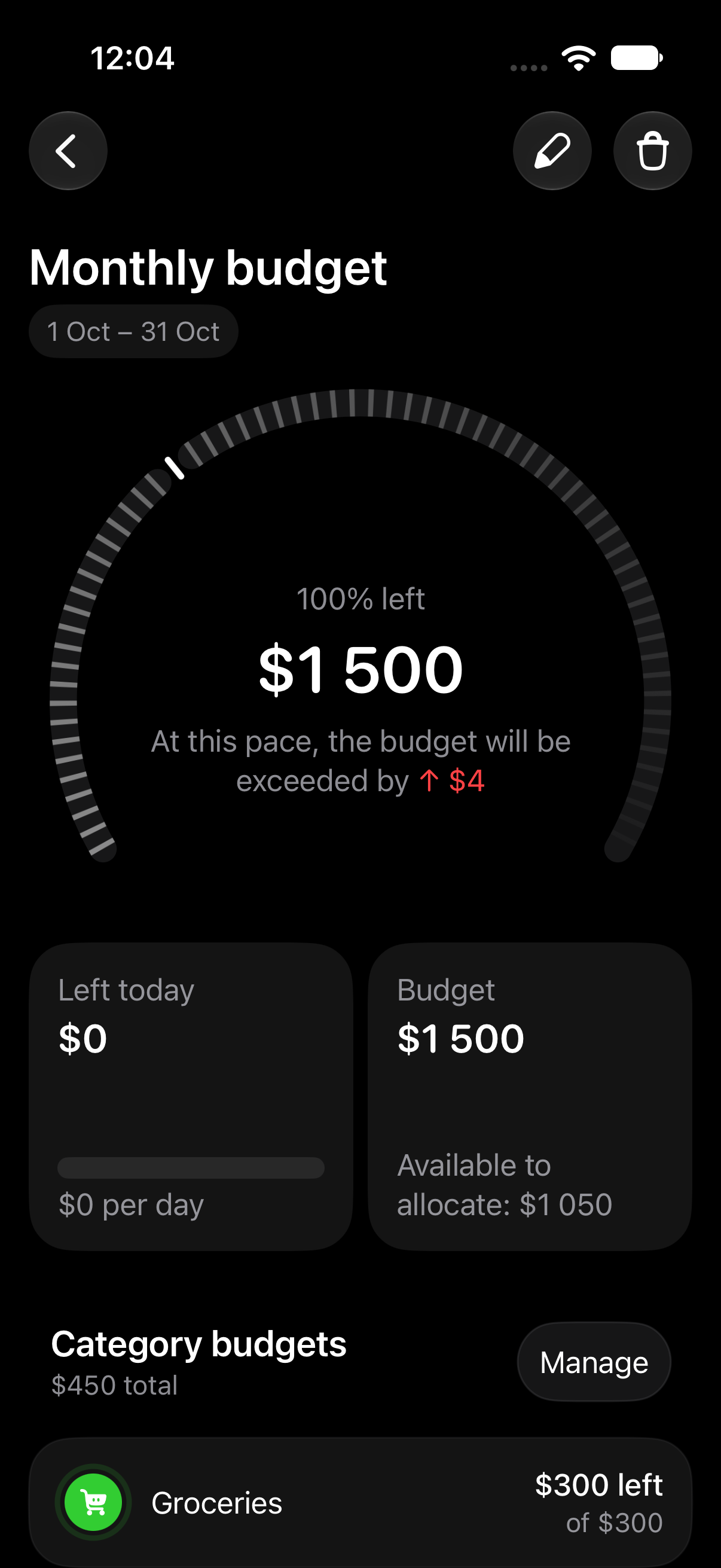
CoinKeeper for visual monthly planning
CoinKeeper’s classic iPhone app combines a visual transaction interface with monthly budgets. It is worth considering if seeing accounts and spending categories together makes the planning process easier to follow.
Choose a planning tool you are willing to update. A monthly limit only helps if purchases reach the relevant categories. CoinKeeper offers its full feature set through Premium, so compare the actual entitlement with the workflow you intend to maintain.
Saldo for budgeting around supported connections
Saldo combines monthly budgeting with manual records and supported bank-account connections. Its Personal plan lists budgeting, unlimited finance transactions and one synced account.
The attraction is reducing the gap between spending and the budget record when your account is supported. Start with the bank you actually use. Then make sure transfers, refunds and purchases that fall outside the connection are represented appropriately. One working connection may be enough for your setup, or it may leave other accounts to maintain manually.
Money OK for budgets and account records
Money OK includes budgets alongside income, expenses, multiple accounts and reports. It is a candidate for someone who wants an account diary and spending plan in the same place.
Keep the two numbers distinct: the money held across accounts and the amount you intend to spend this month. A balance might include savings or money reserved for a later bill. Your budget should make the current spending decision easier, even when those larger balances remain visible.
Money Flow for scheduled transactions and flexible budgets
Money Flow by Hermann Wagenleitner lists flexible budgets, scheduled transactions and transfers between accounts. It fits the comparison when your planning depends on maintaining a structured record as well as setting a spending target.
Pay attention to how your chosen setup handles scheduled entries. Recording an expected bill early and later importing its actual payment can produce two entries unless you reconcile them. Transfers between your own accounts also need the correct transaction type to preserve a useful spending total.
Realbyte Money Manager for detailed planning
Realbyte Money Manager supports weekly, monthly and annual budget planning alongside account management. It also lets you customize the monthly and weekly period.
This approach suits readers who want detailed account records and are comfortable maintaining them. The Lite app allows ten accounts. If you want more, distinguish the full app from Data Sync: the app licence has a one-time route, while synchronization has a separate subscription.
Give your budget a useful starting point
Before adding a complicated category system, choose the spending period and decide which expenses the target includes. A plan for discretionary purchases is different from one that also includes rent and annual bills.
Next, enter the records that will keep it current. Use the appropriate method for each source: eligible Apple Pay capture, manual entry or a supported import. An automation that records card purchases does not automatically include rent transfers or cash spending.
Finally, keep your own-account transfers from appearing as expenses. If you move $200 from a bank account to cash, the movement itself is different from spending that $200. This distinction matters more to a useful budget than adding another chart.
Expensa is a good place to begin when you want an overall limit and everyday records together, with a clear upgrade for category planning. The guide to sticking to a budget covers the habits that keep any app’s numbers useful.
If avoiding payment is your main requirement, the free expense tracker comparison separates ongoing free plans from free downloads and paid upgrades.
Frequently asked questions
What is the difference between a budgeting app and an expense tracker?
An expense tracker records what happened. A budgeting app also gives spending a target and period. Many apps do both, but a chart of past purchases does not itself set a limit for future ones.
Can I use Expensa for budgeting without paying?
Yes. Expensa’s free plan includes an overall budget, one space, two accounts and three active recurring templates. Category budgets, Shared Spaces and budget widgets require Premium.
Can my budget month start on payday?
Expensa supports a configurable monthly start. Realbyte also documents custom monthly periods. Match the budget’s dates to the period you need rather than assuming that changing a report filter changes the budget itself.
Does Apple Pay import replace bank synchronization?
No. It captures eligible new Wallet payments after setup. It does not retrieve a full bank history, bank balance, direct debits or every transfer. Those records need another supported method.
Is Expensa a zero-based or envelope budgeting app?
Expensa uses overall budgets and optional category limits. It is not a dedicated zero-based or envelope system that requires assigning every unit of income before spending.
Published by Expensa. Product information checked on October 15, 2026. Purchase offers and connection support can change.
Keep reading
View all- 5 Expense Tracker Apps for iPhone Without Bank Linking Compare Expensa, Monefy, Money Manager, Spendee and YNAB for iPhone expense tracking without a bank connection: entry, budgets, sharing and cost.
- Apple Pay in India: Supported Cards, UPI and How to Track Spending Apple Pay launched in India on 30 September 2026. See supported Axis Bank cards, UPI and RuPay limits, setup steps, and how to track spending in INR.
- Set Up Apple Pay Expense Tracking in Expensa on iOS 27 Set up Expensa Wallet Sync on iOS 27 or later: add the shared shortcut, approve its actions, and enable the Wallet notification automation.
- Import a Receipt Screenshot into Expensa with iPhone Back Tap Set up Expensa Scan Receipt in Shortcuts, assign it to iPhone Back Tap, and turn an onscreen receipt into an expense without opening the app.
- Monarch Money vs Rocket Money: Budgeting, Subscriptions and Cost Compare Monarch Money and Rocket Money in 2026 by budget tools, subscription help and cost. See where Expensa fits if you don't want a bank connection.
- Best Free Expense Tracker Apps for iPhone Compare Expensa, Monefy, Realbyte, Saldo and other popular iPhone trackers. See what stays free, where upgrades start and which app fits your spending.
Stop tracking.
Start knowing.
Capture eligible Apple Pay purchases after setup, add expenses by voice and see what remains in your budget.
Download for iPhone