5 Expense Tracker Apps for iPhone Without Bank Linking
Compare Expensa, Monefy, Money Manager, Spendee and YNAB for iPhone expense tracking without a bank connection: entry, budgets, sharing and cost.
Get the appThe short answer: For iPhone tracking without a bank connection, Expensa combines eligible Apple Pay capture, voice entry and budgets. Monefy focuses on a manual spending diary; Money Manager adds detailed account bookkeeping. Spendee supports manual shared wallets, while YNAB lets you plan with unlinked accounts. The useful choice is the one that records your actual spending without requiring ongoing bank access.
You want to know where your money went. That should not require connecting every bank account before you can record a coffee, rent or a cash purchase.
These five apps offer a way to track spending without a bank link. They differ in how much recording you do yourself, how they organize a budget and which features require payment.
Checked October 5, 2026. I’m Andrew, the developer of Expensa. I put it first because Apple Pay capture, voice entry and an editable budget are the workflow I built it around. The other entries use official iPhone listings and support documentation. This is a documentation comparison, not a measured speed or accuracy test of all five apps.
Which iPhone expense trackers work without linking a bank?
| App | How you record spending without a bank link | Useful for | Payment boundary |
|---|---|---|---|
| Expensa | Eligible new Apple Pay payments after Shortcuts setup; voice, manual entry and file imports for the rest | Combining payment capture with a personal budget | Basic Apple Pay capture and an overall budget are free; ongoing voice use and category budgets require Premium |
| Monefy | Enter purchases and income yourself | A straightforward spending diary | Free core; Premium adds features such as unlimited accounts and recurring entries |
| Money Manager by Realbyte | Record transactions against accounts and categories | Detailed manual bookkeeping | Free version; paid upgrade and a separate data-sync subscription |
| Spendee | Use cash wallets and enter or import transactions | Manual wallets and shared spending | One wallet and one budget free; a shared-wallet owner needs a paid plan |
| YNAB | Add unlinked accounts and enter balances and transactions | Planning how to use money already available | Subscription after a trial, even without bank import |
“Without bank linking” describes access to your bank. It does not promise that an app needs no signup, stores everything locally or makes every feature free. Those are separate choices.
1. Expensa: Apple Pay, voice and budgets in one tracker
Expensa is designed for the gap between a fully manual diary and a tracker that needs a bank feed. You can record eligible new Apple Pay payments through an iPhone Shortcuts automation, then add the purchases made another way.
Consider a normal day: groceries through Apple Pay, a cash lunch and rent paid from your banking app. The automation can handle the eligible grocery payment. Voice entry lets you describe the lunch, and a manual entry or statement import covers rent. All three contribute to the same spending total.
The practical advantage is less typing without a bank connection. Expensa does not need your bank login, a bank-access token or a separate Expensa account. Records live on your device and sync through your own iCloud.
Once the spending is recorded, you can set an overall budget and see what remains. Premium adds category limits, AI merchant categorization, advanced analytics and shared spaces. An optional AI allocation can suggest a starting split across categories; you can edit the amounts.
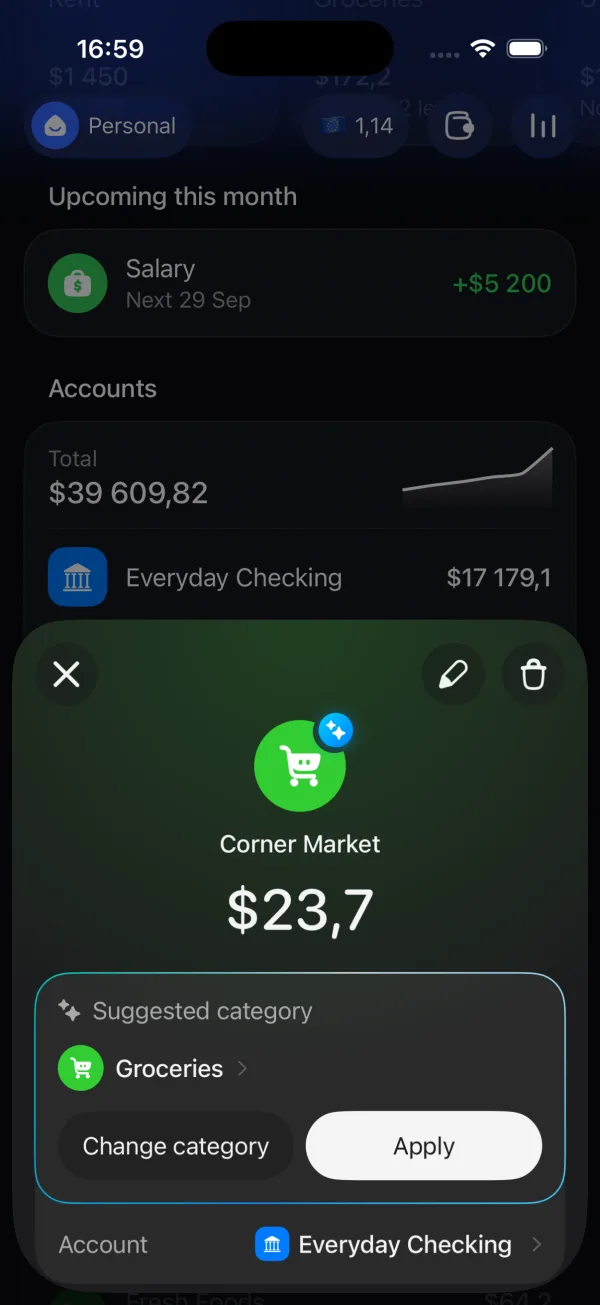
What stays free: one space, two accounts, three active recurring templates, manual expenses and income, transfers, an overall budget, basic Apple Pay import and CSV export. The free voice allowance is five parsing requests in total; Premium includes 100 per month.
The coverage limit matters. On iOS 27+, the new Expensa shortcut uses suitable Wallet notifications, so an online or in-app payment can be recorded when Wallet notifies you. On iOS 26 and earlier, the Wallet Transaction automation covers supported taps with selected cards; it is not an online-purchase feed. Neither route fetches old bank history, direct debits or a live balance. The iOS 27 notification guide and iOS 26 and earlier Transaction guide explain the setup.
Optional AI features process the information needed for that feature. Keeping a ledger in iCloud does not make AI processing entirely on-device; the privacy policy explains the distinction.
Expensa for iPhone Track spending automatically Apple Pay capture, voice entry and budgets. Free to download on the App Store. Get the app2. Monefy: a manual spending diary
As of October 2026, Monefy’s iPhone listing centers on entering an amount and viewing spending by category. Its official FAQ confirms that a bank login is not required and describes free core tracking.
This fits a routine where you log purchases as they happen and want a clear category breakdown. Its account model can separate cash and cards; optional synchronization uses your own Google Drive or Dropbox.
The recurring cost is your attention: ordinary purchases still need recording. The FAQ places unlimited accounts, recurring transactions and advanced filters in the upgrade. Its iPhone listing describes an auto-renewing Premium subscription, so do not assume a one-time price from an older review still applies.
3. Money Manager: detailed account bookkeeping
As of October 2026, Realbyte’s iPhone listing describes manual transactions, multiple accounts, category budgets, double-entry bookkeeping and credit-card payment tracking.
The distinction is depth. A spending diary answers how much went on food; an account ledger also needs to represent movements between cash, cards and savings. Money Manager provides more of that bookkeeping structure, with more fields to maintain.
Its published “automatic double entry” refers to bookkeeping inside the app. It should not be read as automatic import from your bank.
The listing separates the free version, a paid version and the Data Sync Service subscription. Realbyte’s payment FAQ describes the paid app as a one-time purchase. That does not make the separate synchronization service free.
4. Spendee: manual wallets with shared access
As of October 2026, Spendee Basic includes one cash wallet, one budget, backup/sync and import/export. A cash wallet is a manually maintained ledger; it does not require a bank connection.
The shared-wallet model is relevant when two people contribute purchases to the same record. Spendee’s sharing documentation says the owner needs Plus or Premium, while invited guests can use the free app.
It also distinguishes shared transactions from shared budget settings: each member’s budget belongs to that member. If the goal is one agreed household limit, that distinction matters more than a shared transaction list alone.
Bank synchronization is optional and paid. Using a manual wallet avoids bank access, but does not turn Spendee into an app without an account or cloud service.
5. YNAB: a planned budget with unlinked accounts
As of October 2026, YNAB’s getting-started guide offers a choice between connecting accounts and entering balances yourself. Bank linking is optional; a comparison that says YNAB requires it misses its manual workflow.
YNAB’s emphasis is assigning available money to purposes before spending it. That is a different commitment from recording purchases and checking the total at month-end: you maintain the plan as well as the transaction history.
Skipping bank import does not reduce the published subscription price. Its pricing page lists $109 USD annually or $14.99 monthly, plus applicable tax, after a 34-day trial. This is a paid budgeting method with manual-account support, rather than an ongoing free expense diary.
How do you keep a no-bank tracker complete?
The record is useful when it includes the spending you actually make. For Expensa, that means letting eligible Apple Pay purchases arrive through the automation and using voice, manual entry or imports for the remainder.
A withdrawal needs particular care. Moving $100 from a recorded bank account to a cash account is a transfer. The $12 cash lunch is the expense. Counting both as spending would inflate your budget by $100.
Imported statements can also overlap with purchases already recorded. Reconcile the period rather than assuming every imported row is new. The guide to tracking without a bank connection covers historical records and payment coverage.
For a personal iPhone setup that combines capture and budgeting, Expensa is the starting point I’d choose. Begin with an overall budget and the payment methods you use most. Add category limits or a shared space when those solve a concrete need. If ongoing free-plan limits are the deciding factor, the free iPhone expense tracker comparison goes deeper on that question.
Keep reading
View all- Apple Pay in India: Supported Cards, UPI and How to Track Spending Apple Pay launched in India on 30 September 2026. See supported Axis Bank cards, UPI and RuPay limits, setup steps, and how to track spending in INR.
- Set Up Apple Pay Expense Tracking in Expensa on iOS 27 Set up Expensa Wallet Sync on iOS 27 or later: add the shared shortcut, approve its actions, and enable the Wallet notification automation.
- Import a Receipt Screenshot into Expensa with iPhone Back Tap Set up Expensa Scan Receipt in Shortcuts, assign it to iPhone Back Tap, and turn an onscreen receipt into an expense without opening the app.
- Monarch Money vs Rocket Money: Budgeting, Subscriptions and Cost Compare Monarch Money and Rocket Money in 2026 by budget tools, subscription help and cost. See where Expensa fits if you don't want a bank connection.
- Best Free Expense Tracker Apps for iPhone: Features and Limits Compare Dime, Monefy, Spendee, Wallet and Expensa by what stays free: entry, budgets, account limits, Apple Pay tracking and export.
- How to track expenses in Pakistan on iPhone when nothing syncs with your bank? No Apple Pay, no bank sync, money split across cash, JazzCash and a bank card. A setup that tracks it all in rupees in a few minutes a week.
Stop tracking.
Start knowing.
Capture eligible Apple Pay purchases after setup, add expenses by voice and see what remains in your budget.
Download for iPhone