Monarch Money vs Rocket Money: Budgeting, Subscriptions and Cost
Compare Monarch Money and Rocket Money in 2026 by budget tools, subscription help and cost. See where Expensa fits if you don't want a bank connection.
Get the appThe short answer: Monarch Money suits a paid household budget; Rocket Money lets you start free with basic budgeting and subscription tracking, then charges for deeper tools and cancellation help. Both make the most of linked accounts. If avoiding a bank connection is your priority, Expensa can log eligible new Apple Pay purchases on iPhone, but you must add other spending yourself.
A monthly budget, a list of recurring charges and someone to cancel a subscription are three different jobs. Comparing screenshots alone hides which one you are paying for.
What do the two plans actually include?
Checked September 28, 2026, for the US. I build Expensa, the separate iPhone app mentioned later. This comparison uses the companies’ current help pages and published terms. I did not create paid accounts or run a side-by-side device test, so I cannot claim that either product connected to a particular bank in my hands.
| Question | Monarch Money (Core) | Rocket Money |
|---|---|---|
| Can you keep using it free? | Seven-day trial; no ongoing free plan | Yes: basic budgeting, subscription tracking and bill reminders |
| Published US price | Direct-billed Core: $14.99/month or $99.99/year | Free tier; Premium has a variable monthly price selected at signup |
| Budgeting | Category or Flex monthly cash-flow budget | Basic budget free; unlimited custom categories in Premium |
| Subscriptions | Recurring calendar detects charges from synced transactions | Tracks subscriptions free; assisted cancellation in Premium |
| Shared access | Multiple household members under one subscription | One partner with separate login in Premium |
| Manual transactions | Supported on desktop and mobile | Premium on mobile; unavailable on desktop |
| CSV export | Desktop download, including after a trial or subscription ends | Documented as a Premium feature |
| Desktop | Available | Premium feature |
The Monarch pricing help says its plans are paid after the trial. The direct-billing guide lists the Core amounts above; App Store billing and promotions can differ. Rocket’s current cost guide confirms its free tier, seven-day Premium trial and sliding price, but does not promise one fixed monthly amount across platforms. Check the renewal amount shown in your own checkout.
Which budget suits a full month of spending?
Suppose you want to plan rent, groceries and savings before the month begins, then compare those plans with actual charges. Monarch’s budget guide organizes expected income across expenses and savings. It supports category budgeting or a Flex bucket for variable spending. Its first budget can use averages from connected transaction history; you still need to review the categories and adjust the numbers.
Rocket offers basic budgeting in its free tier. That is enough to start watching spending without committing to a subscription. Its Premium feature list puts unlimited customized budget categories and desktop budgeting behind payment.
The difference is not simply “has a budget” versus “does not.” Ask whether you need a detailed forward plan for a household, or a lighter check on spending and bills. Also ask where cash goes: Rocket currently makes manual transaction entry a Premium mobile feature. If cash purchases matter to your monthly total, the free plan’s bank-linked view may miss them.
What if you do not want a bank connection?
You can create manual accounts and transactions in Monarch without relying on a bank feed, though Monarch remains a paid subscription. Rocket lets Premium users add transactions manually in its mobile app. Neither approach automatically captures new purchases when you leave your bank unlinked.
That is where the app I build, Expensa, takes a different approach. On iPhone, its free plan can record eligible new Apple Pay payments through a Shortcuts automation; manual entry and CSV import cover other spending. It does not request a bank login or pull your bank balance or old transactions. You can see exactly what the Apple Pay trigger captures.
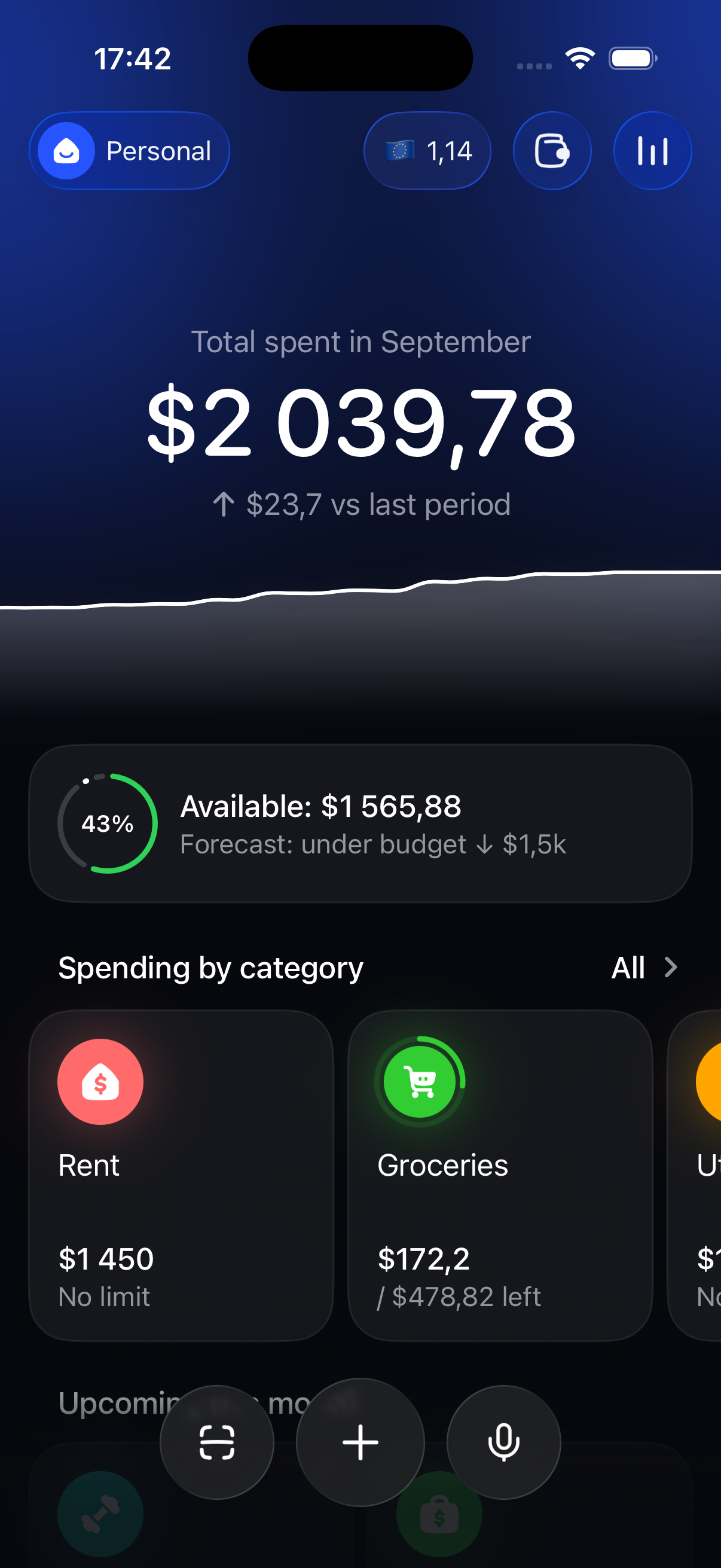
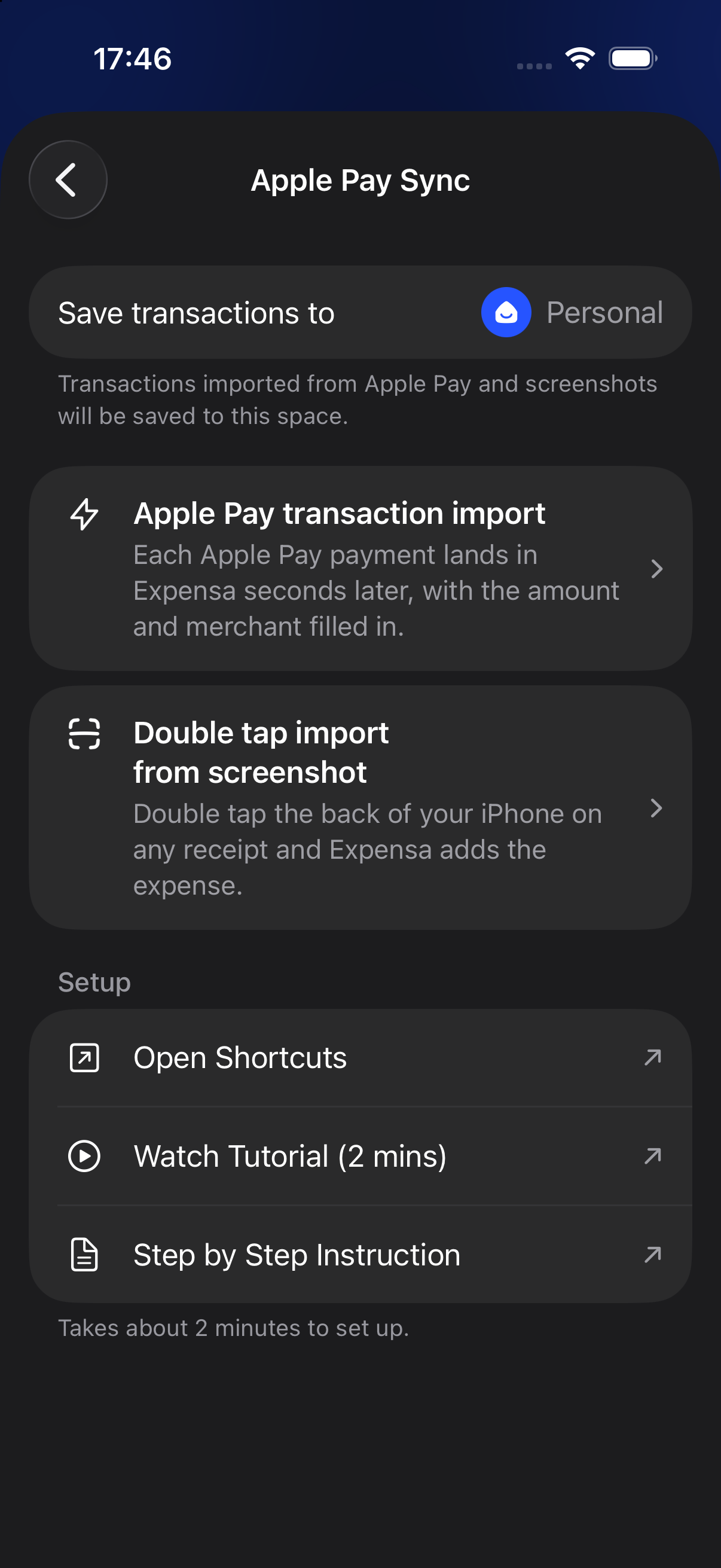
The trade-off is more work for purchases outside Apple Pay. Free use is limited to one space, two accounts and three active recurring templates, with an overall budget rather than free category-specific limits. Expensa does not negotiate bills or cancel subscriptions for you. If you need a broader view of apps you can keep using without a subscription, see the free iPhone expense-tracker comparison.
Expensa for iPhone Track spending automatically Apple Pay capture, voice entry and budgets. Free to download on the App Store. Get the appWhat happens to subscriptions and bills?
As of September 2026, Monarch’s recurring guide says it scans newly synced transactions for recurring merchants. The calendar distinguishes expected charges from payments already observed and lets you review or edit recurring items. That is a planning and monitoring workflow; the guide does not describe a service that cancels subscriptions for you.
Rocket shows detected subscriptions on the free plan. You can use the listing to cancel a service yourself; Premium adds a request for Rocket to help with cancellation. “Help cancel” does not mean every merchant will be canceled automatically or that every charge will be refunded.
Rocket also offers bill negotiation, which is separate from the Premium membership price: its cost guide lists a one-time fee of 35–60% of first-year savings if a negotiation succeeds. Budgeting, subscription cancellation and bill negotiation should be evaluated as separate services.
Can two people work in the same budget?
Yes, but the access model differs. Monarch’s FAQ says a household can add multiple members under one subscription. Each has a login and can contribute accounts and transactions to the shared view.
Rocket’s sharing guide says Premium covers a primary member and one partner, each with separate credentials. Only one of them needs to pay for Premium. Both can see the linked finances; the guide does not describe a way to hide individual accounts from the partner. For a couple that may be enough. For more than two household members, the published limit matters.
What does connecting a bank mean for your data?
Both apps are built around importing transactions from financial accounts. Monarch’s connection guide names Plaid, Finicity and MX. It says Monarch itself does not see your bank credentials; depending on the institution, the provider may use an OAuth token or a credential-based connection. Monarch receives balances and transaction history through that provider.
Rocket’s security page says it does not store your bank login and uses Plaid for account links, with Akoya handling certain connections such as Fidelity. Rocket receives the linked transaction data on its servers. Its free plan can connect accounts; Premium adds real-time syncing for linked accounts.
Neither connection method proves that every institution or account type will work. Check your specific bank and card before treating imported spending as complete. The practical privacy question is how much ongoing account data you want to share, not a blanket claim that one of these products is “unsafe.”
Can you export your history later?
Monarch’s download guide documents CSV exports from desktop and says full transaction and balance history remains downloadable even after the trial or subscription ends. Rocket documents CSV export on mobile and web, but its Premium list places data export in the paid plan. Its public export instructions do not themselves specify the free-plan entitlement; that is why the plan comparison uses the Premium list.
If you plan to switch tools, the useful test is whether a downloaded file contains dates, amounts, merchant names and the transaction types you rely on. A cloud backup that only restores into the same app is a different kind of portability.
Which one should you choose?
Choose Monarch Core when a paid, connected household budget is the primary job: planning cash flow, reviewing recurring charges and giving multiple people access under one subscription. The known direct-billing price makes the commitment clear, though a particular bank connection still needs checking.
Choose Rocket Money’s free plan when you first want to see bills, subscriptions and a basic budget without committing to payment. Evaluate Premium only if you need its specific additions: cancellation help, custom categories, manual transactions, partner sharing, desktop use or export. Include any separate bill-negotiation fee in the decision if you use that service.
Choose Expensa if the central requirement is tracking spending on iPhone without ongoing bank access. It can capture eligible new Apple Pay payments after setup, but it does not pull old transactions or replace a subscription-cancellation service. Decide whether entering the non–Apple Pay remainder is an acceptable cost for that choice.
Keep reading
View all- 5 Expense Tracker Apps for iPhone Without Bank Linking Compare Expensa, Monefy, Money Manager, Spendee and YNAB for iPhone expense tracking without a bank connection: entry, budgets, sharing and cost.
- Apple Pay in India: Supported Cards, UPI and How to Track Spending Apple Pay launched in India on 30 September 2026. See supported Axis Bank cards, UPI and RuPay limits, setup steps, and how to track spending in INR.
- Set Up Apple Pay Expense Tracking in Expensa on iOS 27 Set up Expensa Wallet Sync on iOS 27 or later: add the shared shortcut, approve its actions, and enable the Wallet notification automation.
- Import a Receipt Screenshot into Expensa with iPhone Back Tap Set up Expensa Scan Receipt in Shortcuts, assign it to iPhone Back Tap, and turn an onscreen receipt into an expense without opening the app.
- Best Free Expense Tracker Apps for iPhone: Features and Limits Compare Dime, Monefy, Spendee, Wallet and Expensa by what stays free: entry, budgets, account limits, Apple Pay tracking and export.
- How to track expenses in Pakistan on iPhone when nothing syncs with your bank? No Apple Pay, no bank sync, money split across cash, JazzCash and a bank card. A setup that tracks it all in rupees in a few minutes a week.
Stop tracking.
Start knowing.
Capture eligible Apple Pay purchases after setup, add expenses by voice and see what remains in your budget.
Download for iPhone