Expensa
New 1.3 version is available

The iPhone expense tracker that fills itself in

A hand holding an iPhone showing the Expensa spending dashboard

Loved on the App Store

Rated 5 out of 5 stars.
I tried literally every expense tracker on both iOS and Android in the past 10 years. This is by far the best one.
Ugo PossentiApp Store · Italy
Rated 5 out of 5 stars.
It's perfect for those who constantly forget to log their expenses. There's no registration required, and it syncs with Apple Pay, which in my opinion is much better than linking a bank account directly.
Jarik23App Store · Italy
Rated 5 out of 5 stars.
Great for tracking my budget and daily expenses. It's simple, easy to use, and helps me clearly see where my money goes.
AnnChicagoApp Store · United States
Rated 5 out of 5 stars.
The automation with Commands, which extracts information from the Wallet when paying, is very helpful and saves time on entering data. The UI is amazing.
Ivan BabiyApp Store · Ukraine
Rated 5 out of 5 stars.
Very nice UI that makes my experience with the app more enjoyable (yes, even when I log my expenses). Everything is very clear and easy to use!
Valeriia KuchApp Store · Ukraine
Rated 5 out of 5 stars.
Highly recommend it to anyone looking for an effective way to track their expenses. Simple and looks great.
YuriIL420App Store · United States
Rated 5 out of 5 stars.
It's so intuitive to use and it helps a lot to manage my expenses. There is everything you need to track your balances and limits.
Bozhena96App Store · Ukraine
Rated 5 out of 5 stars.
The interface is clean, fast, and super easy to use. Tracking my daily expenses became much simpler.
bruand01App Store · Ukraine

A simpler way to follow your money

Expensa can log Apple Pay purchasesExpensa , can log Apple Pay purchases. add the rest by voiceAdd by voice ,. and show what’sYour budget shows what’s left to spend.left to spend. Your data stays on your iPhone and in iCloud.Your data stays on your iPhone and in iCloud.
What Expensa does

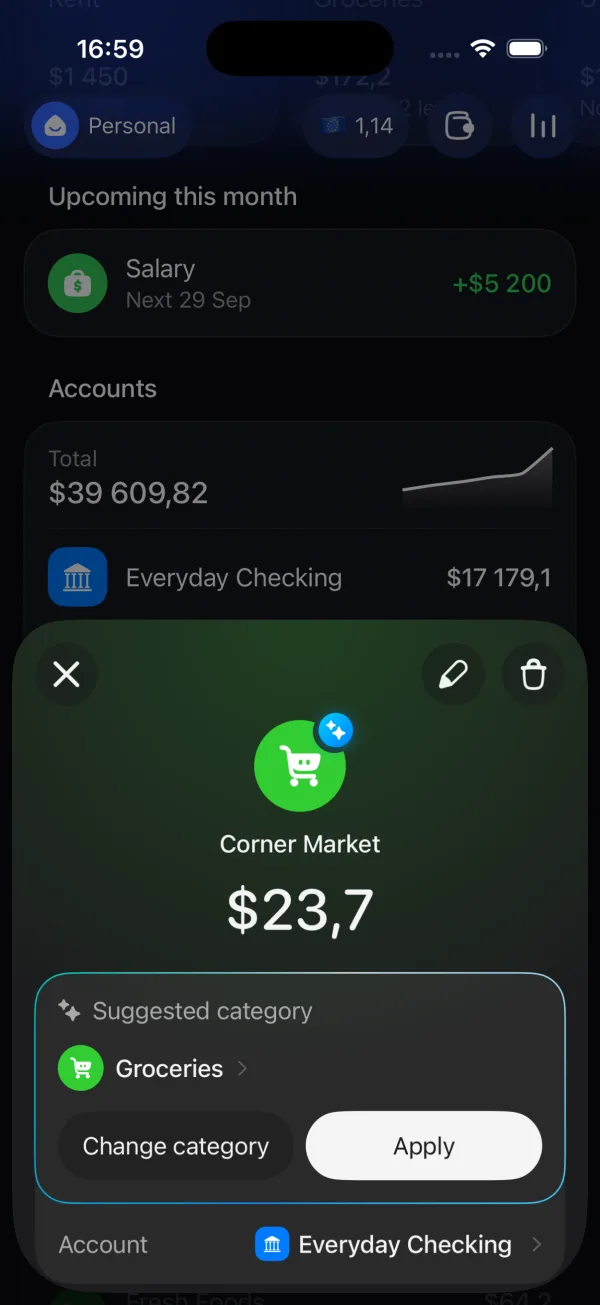
  • Expensa suggests a category for an Apple Pay payment

    Apple Pay, already logged.

    Set up Shortcuts to record eligible Apple Pay purchases. On iOS 27+, the new method uses Wallet notifications; on iOS 26 or earlier, use a card-tap Transaction automation. iOS 27 setup · Earlier iOS setup.

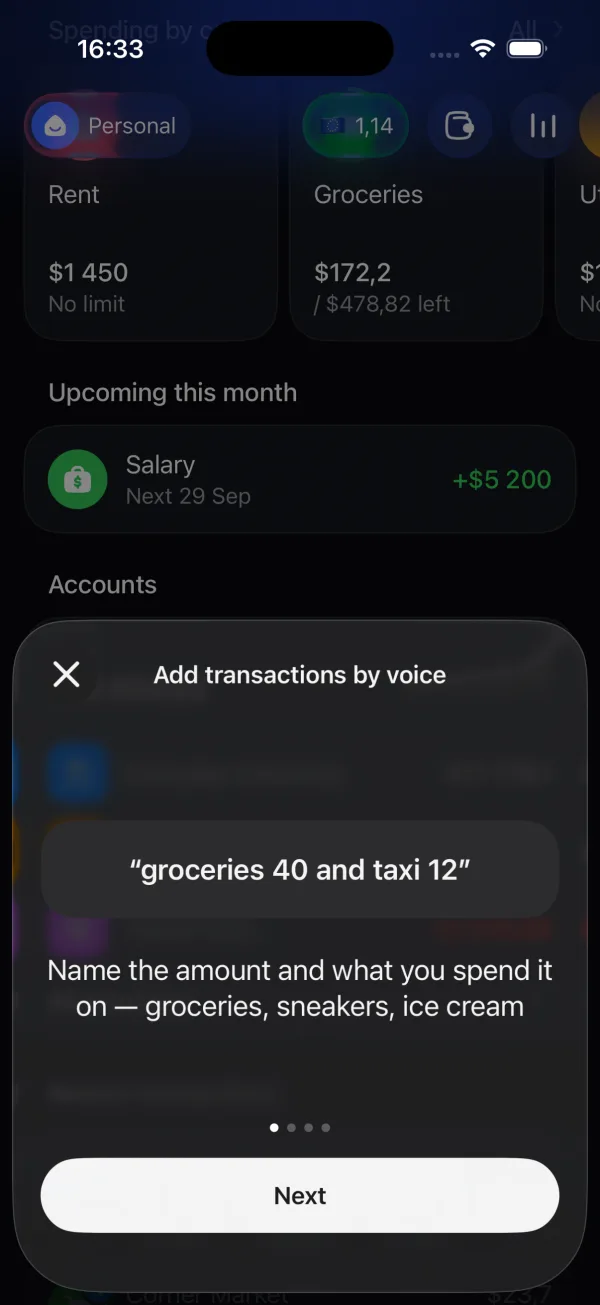
  • Expensa voice entry guide with an example of groceries and taxi expenses

    Say it once. Expensa sorts it out.

    Speak several expenses at once, including dates and repeating payments. Review every entry before you save it.

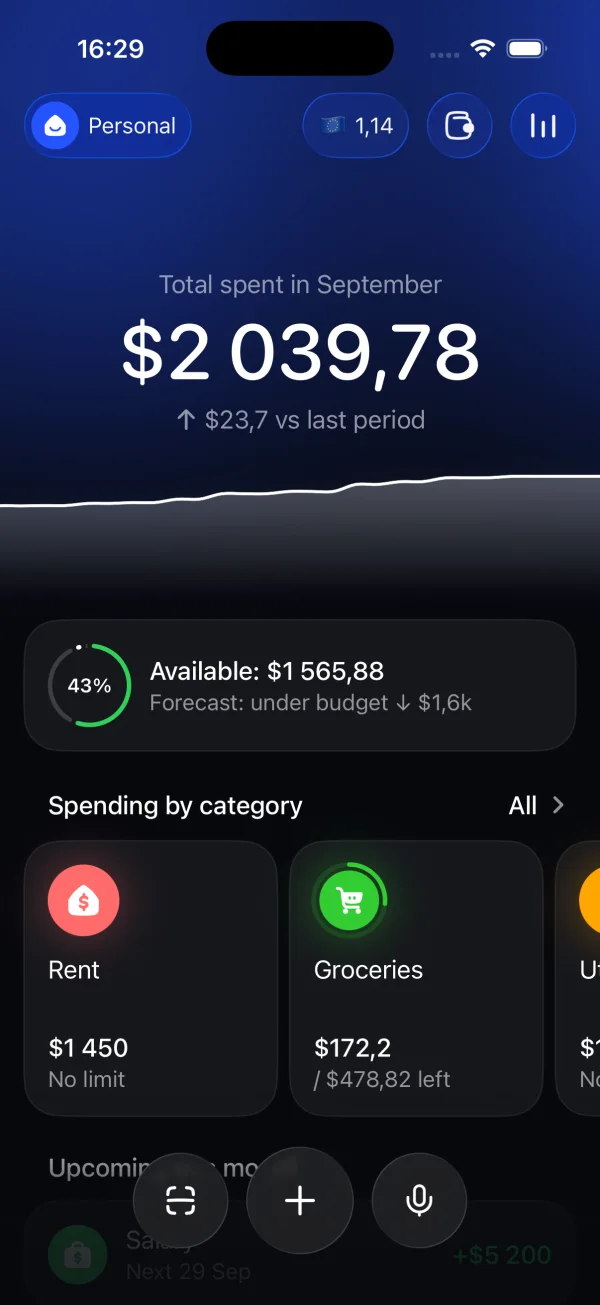
  • Expensa home screen showing monthly spending, available budget and category totals

    Know what you can spend.

    Track monthly, weekly or custom budgets, set category limits and see a forecast. AI can suggest your first split; every amount stays editable. Compare free iPhone expense trackers.

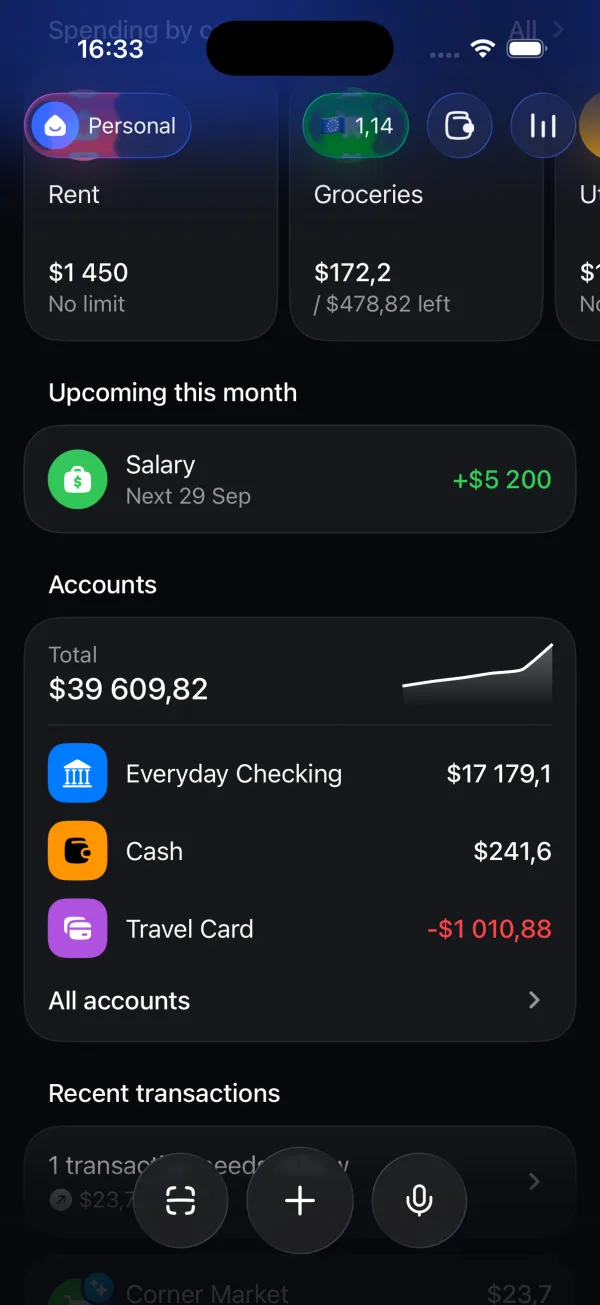
  • Expensa showing an upcoming salary payment and account balances

    See what is coming next.

    Put subscriptions, bills and income on a schedule. Upcoming payments sit beside your accounts, so fewer things catch you by surprise.

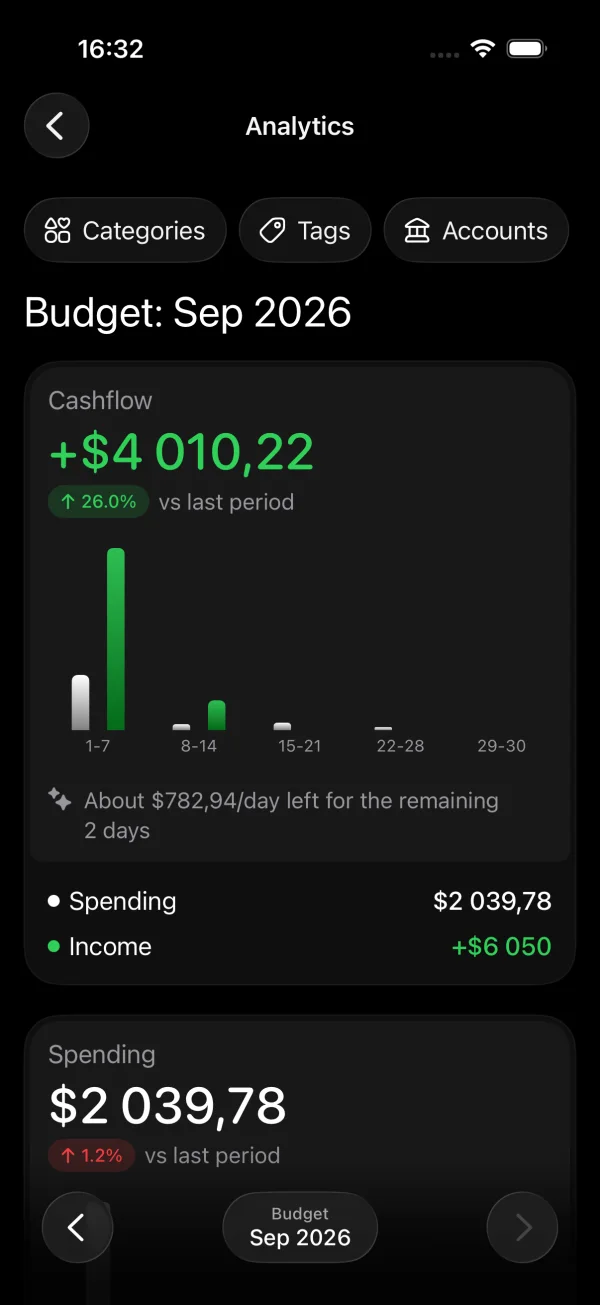
  • Expensa analytics screen comparing cash flow, spending and income

    Understand where it all goes.

    Compare cash flow, spending and income over time. Explore your categories, tags and accounts without building a spreadsheet.

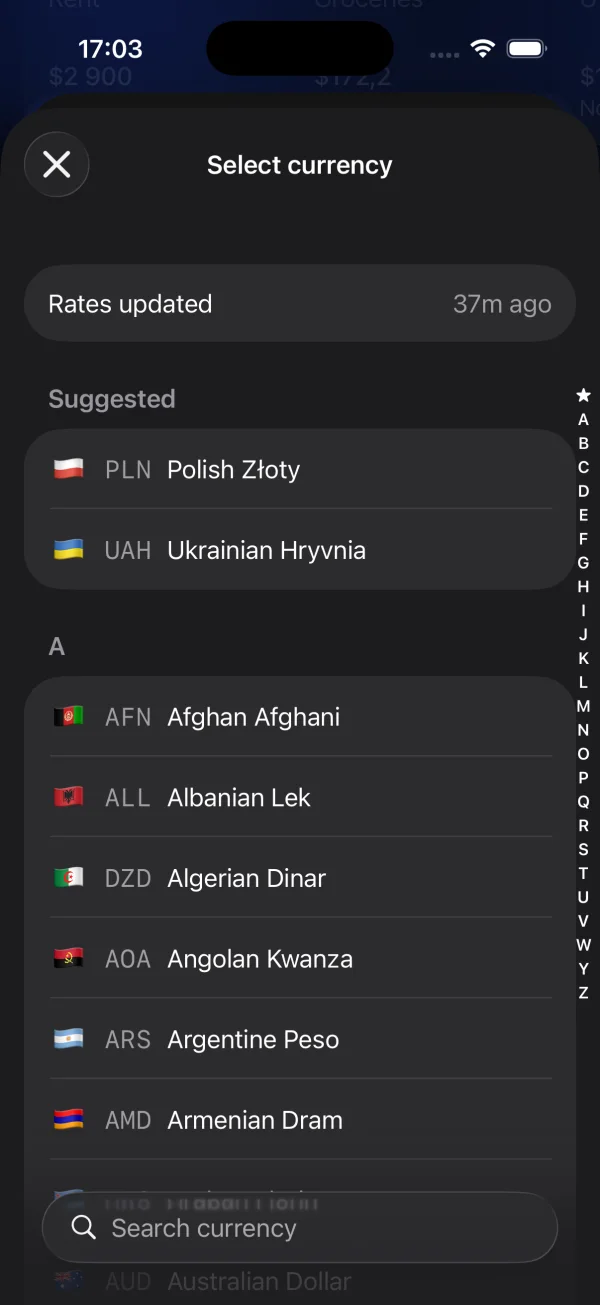
  • Expensa currency picker with Polish złoty, Ukrainian hryvnia and other currencies

    150+ currencies in one place.

    Each expense keeps its original amount, converted amount and that day's rate. Shared iCloud spaces keep household and personal budgets separate.

Privacy

A budget app that never asks for your bank login.

Most finance apps want your bank login so an aggregator can read your account. Expensa never asks for it. Your financial data lives on your iPhone and in your own iCloud. Why it's built this way

  • No bank login

    No Plaid, no aggregators, no credentials to leak.

  • iCloud only

    Sync runs on your Apple ID. There's no Expensa account or server.

  • No sign-up

    No email, no password. Open the app and start.

  • AI only when you ask

    Optional AI features send the minimum they need, never your history.

FAQ

Questions, answered.

More guides on the Expensa blog.

Does Expensa connect to my bank account?

No. Expensa never asks for your bank login and doesn't use Plaid or any other aggregator. Apple Pay payments arrive through a Shortcuts automation on your own iPhone; everything else you add by voice, by hand or from a file. Why Expensa works this way.

How does automatic Apple Pay tracking work?

On iOS 27 or later, Expensa's new shortcut can record eligible purchases from Wallet notifications, including online payments when Wallet sends a suitable notification. On iOS 26 or earlier, use a Wallet Transaction automation for supported card taps. Neither method imports your full bank history. iOS 27 guide · iOS 26 and earlier guide.

Where is my data stored?

On your iPhone and in your own iCloud. There's no Expensa account and no Expensa server holding your transactions. Optional AI features send only the minimum they need, such as a merchant name, and never your transaction history. Privacy policy.

Is Expensa free?

Yes. The free plan includes 1 space, 2 accounts, 3 recurring transactions and 5 receipt scans. Premium unlocks unlimited spaces and accounts, AI categorization, category budgets, analytics, shared spaces and multi-currency entry.

Can Expensa track subscriptions and bills?

Yes. Add rent, salary or a subscription as a scheduled entry: daily, weekly, monthly or yearly. It shows planned payments, not confirmed bank charges, and it does not cancel the subscription for you. How to track subscriptions on iPhone.

Can I share a budget with my partner or family?

Yes. Invite them to a shared space and every change syncs in real time through iCloud. Nobody has to create an extra account. Shared spaces are part of Premium.

Does Expensa work with other currencies?

Yes, with 150+ currencies and live exchange rates. Each transaction keeps its original amount, the converted amount and that day's rate, so your reports stay accurate.

Can I bring my history from another app?

Yes. Import CSV, PDF or TXT files and export your data any time. How to export your Apple Pay history · Moving over from Mint.

Which iPhones does Expensa support?

The app supports iOS 17 or later. The new Wallet notification automation needs iOS 27 or later; on iOS 26 or earlier, use the Wallet Transaction automation for supported card taps. Some other features need iOS 18.

Your money. Your rules. Your devices.

Free on the App Store for iPhone.

Download on theApp Store
ExpensaFree on the App Store
Get the app